

Today we will review GridSearchCV, a method that will help us improve the performance of the models we train entirely using Python.
Sometimes, we need a help to select the best parameters for our models. We cannot always try all of the parameters for Decision Tree, for example.
That’s why, we have got a powerful tool to detect our the best parameters: GridSearchCV. As you can see in its name, it uses CV (cross-validation, a technique used in data science to evaluate the performance of a machine learning model by splitting the data into multiple folds, training the model on some folds and testing it on the remaining folds, and averaging the results).
GridSearchCV can also do:
- Automates hyperparameter tuning,
- Systematically explores parameter combinations,
- Prevents overfitting through cross-validation (which is our main topic nowadays),
- Saves time in model optimization,
- Improves model performance,
- Ensures reproducibility of results,
- Provides insights into parameter importance,
- Facilitates comparison of different models,
- Supports parallel processing for faster execution Integrates seamlessly with Scikit-Learn estimators.
Let’s continue with a good definition of the GridSearchCV: it is a technique in machine learning that systematically tries out different combinations of hyperparameters for a model, aiming to find the best combination for optimal performance. It’s like a brute-force search across a grid of possible parameter values.
So, it tries everything we told and finds the best ones. For instance, if we tell a Decision Tree that ‘your maximum depth can be 2, 3 or 4’, then our GridSearchCV will find the best one with the highest accuracy score (also, you can change the score criteria and do this for F1 score or anything else).
# import required libraries
from sklearn.model_selection import GridSearchCV
from sklearn.tree import DecisionTreeClassifier

# decision tree classifier
dtc = DecisionTreeClassifier()

# parameters for gridsearchcv -before the progress
param_grid = {
    'criterion': ['gini', 'entropy'],
    'splitter': ['best', 'random'],
    'max_depth': [None, 5, 10, 15],
    'min_samples_split': [2, 5, 10],
    'min_samples_leaf': [1, 2, 4]
}

# create gridsearchcv object with our parameters above,
# 5 fold cv, and accuracy type of scoring
grid_search = GridSearchCV(dtc, param_grid, cv=5, scoring='accuracy')

# run gridsearchcv progress on the train dataset
grid_search.fit(X_train, y_train)

# print the best parameters and their accuracy
print("The best parameters:", grid_search.best_params_)
print("Accuracy (on the test dataset):", accuracy)
As you can see in the Python code above, our GridSearchCV model will predict the best parameters from the list of param_grid. After that, Decision Tree model will be created with the highest accuracy score that can be obtained from these parameters.
Isn’t it cool? Python will probably solve the problem that comes to mind most while creating the model in seconds or minutes and will have accomplished a great job. It is something Data Scientists really need!
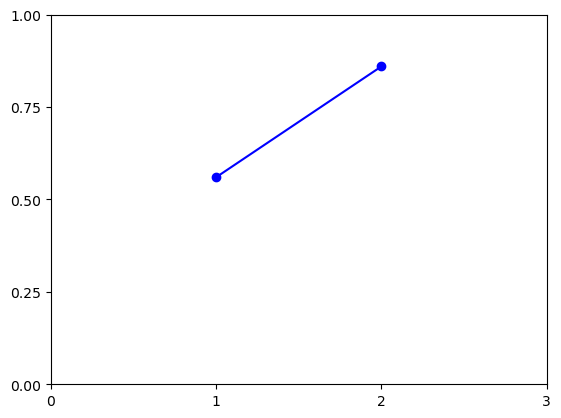
Like in the line graph above, you can improve your accuracy from your model without hyperparameter tuning (1 is before and 2 is after situation in the chart). This is one of the most powerful weapons of a Data Scientist, and by learning it, you can both reduce the time you waste and increase the power of the models you train.
Thanks for reading, I hope that you will find it helpful. That’s all for today! Good day everyone!

 Mert Kont
Leave a reply to The Introverted Bookworm Cancel reply